
Self-host
Run the Open Record server on a machine you control and use it from your phone on the same Wi-Fi. Start with the desktop app; run it from source if you want the server on its own.
Desktop app
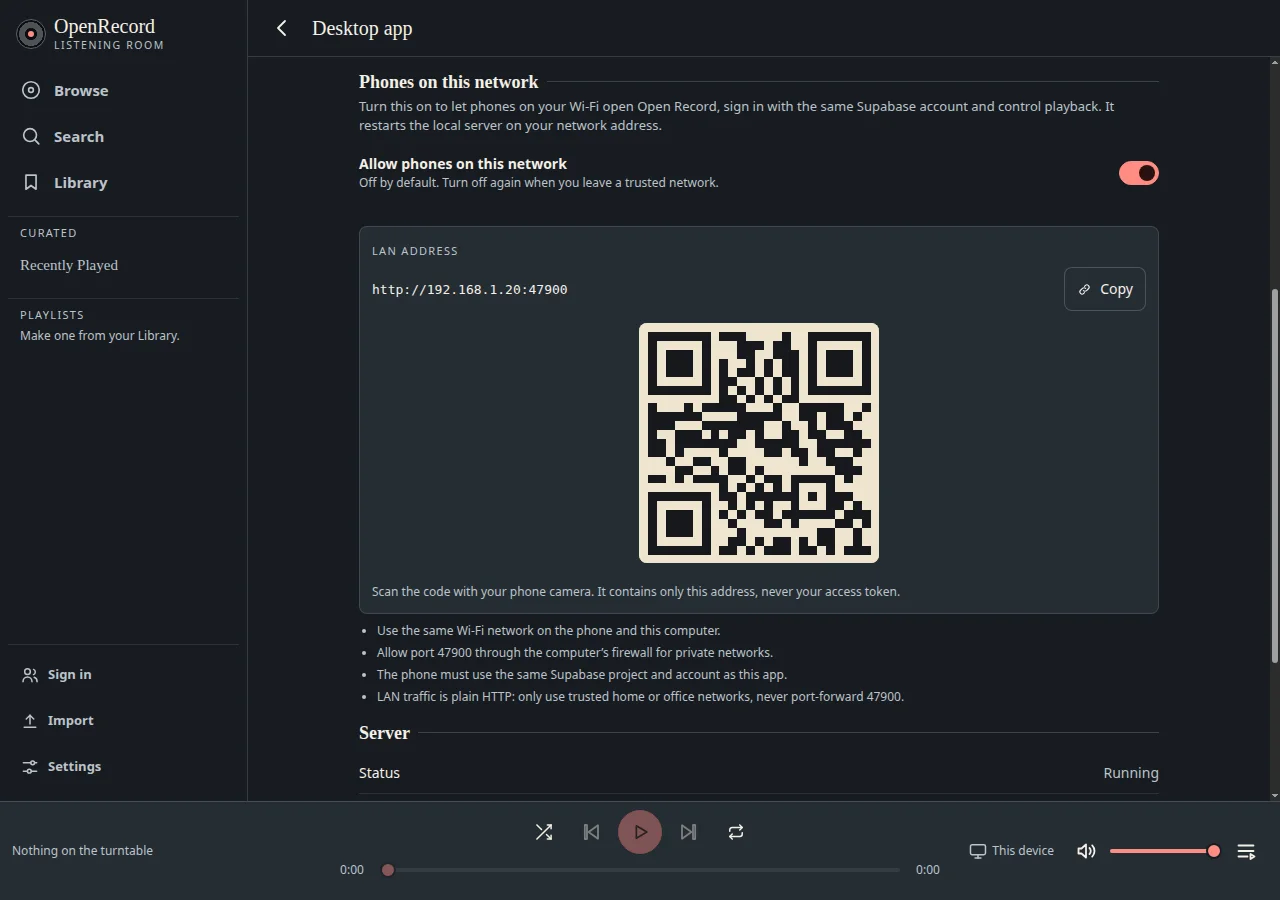
The desktop app runs its own local server. Turn on phone access and your phone can use it over your home Wi-Fi. There is no server setup beyond a firewall rule and your Supabase project.
Install the desktop app
Get the Windows or Linux installer. The installers are unsigned. macOS has no installer yet; build the desktop app from source.
Allow phones on this network
Open Settings > Desktop app, or go to
http://127.0.0.1:47900/desktop. Turn on Allow phones on this network. The server restarts on your network address and shows a LAN address, a copy button and a QR code.Allow TCP 47900 from your own subnet only:
sudo ufw allow from 192.168.1.0/24 to any port 47900 proto tcpOn Windows, allow Open Record on the Private network. On macOS, allow incoming connections for Open Record in System Settings > Network > Firewall.
Pair your phone
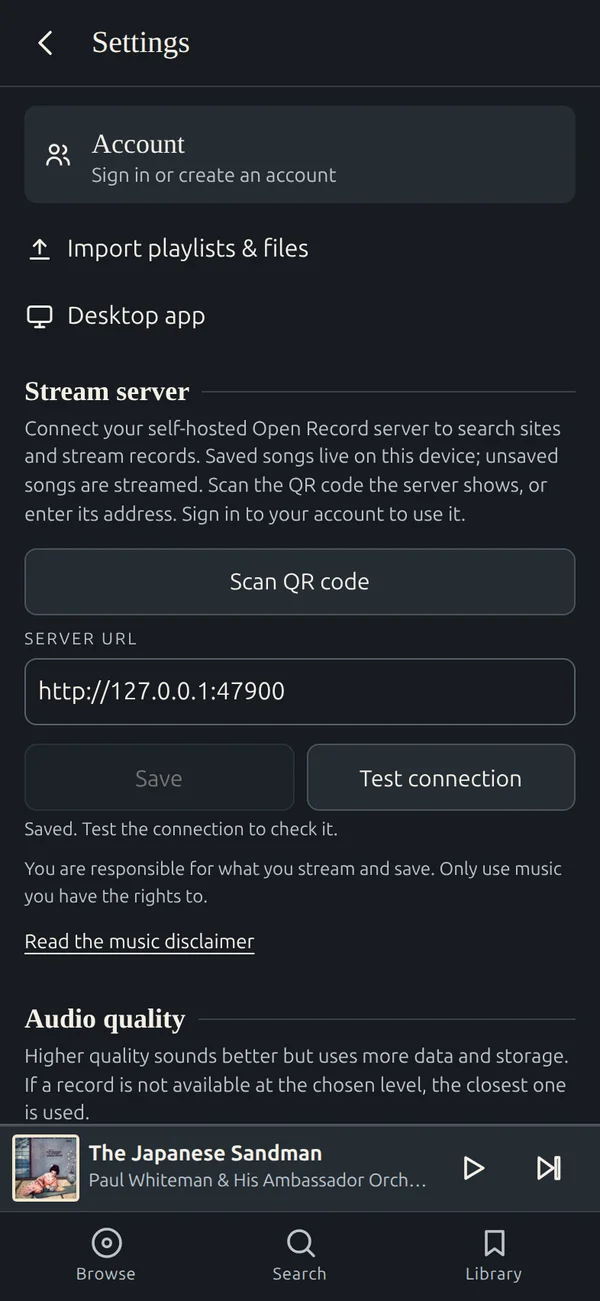
Install the Android APK, or open the LAN address in the phone browser. In the app, go toSettings > Stream server, then choose Scan QR code or type the address. The desktop server never shares its local token with phones, so the phone signs in with the same Supabase account as the desktop app. Set that up first: see Accounts.
Run from source
Run the stream-link server on its own. It serves the web app and the API on one address, and it needs Node 24 and yt-dlp on this machine.
- Node 24 and npm.
- yt-dlp:
pipx install yt-dlp. - ffmpeg (optional): only for transcoding while casting.
Clone and install
git clone https://github.com/ahnafone/open-record.git
cd open-record
npm ci
Start the server
This builds the web app and the server, starts them detached, and prints the address and a pairing QR code. It binds your LAN address by default.
npm run server:up
npm run server:up -- --ip 192.168.1.20   # choose the LAN address
npm run server:up -- --stop              # stop the detached server
npm run server:dev                       # run in the foreground
Connect a device
Open the printed
http://lan-ip:8787/on any device on your Wi-Fi. For the Android app, build it withnpm run androidor install the APK, then use Settings > Stream serverand scan the QR code. For iPhone, follow the iPhone build guide.
Keep it running
For an always-on host, write a systemd user unit that runs the built server instead ofserver:up (the server README has an example). Use HOST=0.0.0.0 and allow only your subnet on port 8787:
sudo ufw allow from 192.168.1.0/24 to any port 8787 proto tcpLAN caveats
- Plain HTTP and a bearer token: use trusted Wi-Fi only. Anyone on the same network can read the traffic.
- Never port-forward 8787 or 47900, and never expose them to the internet.
- Phone and server must share a subnet. Guest networks, separate VLANs and AP isolation block the connection.
- The hosted https web app cannot call an http LAN server (mixed content). Use the page served by your server, or the Android app.
- Reserve a DHCP address for the computer, and keep it awake while you listen.
Away from home
Outside your own Wi-Fi, use HTTPS. The simplest private option is Tailscale: runtailscale serve --bg 8787 on the server, then use the https:// address it gives you. You can also put your own HTTPS reverse proxy in front of the server.
- Start the server with
npm run server:up -- --host 127.0.0.1so only the proxy can reach it. Phones must be on your tailnet for the Tailscale route. - Set
PUBLIC_URLto the HTTPS address, so the banner and QR code show it. - Cast speakers cannot reach a loopback-only server. Set
CAST_RELAY_PORTfor casting; see the server README. - Set
TRUST_PROXY=127.0.0.1only when the proxy runs on the same machine. Never setTRUST_PROXY=truewhile the port is reachable from your LAN. - Still never port-forward the port. The server README has the full settings.
Accounts and sync (optional)
Sign-in, sync and shared playlists use a Supabase project that you create and own. Open Record hosts no accounts. Running the server from source does not require Supabase: its pairing QR carries the token. The desktop app's phone pairing does: phones sign in with the same Supabase account as the desktop app.